# Build your data file from scratch
In this section, we will recreate step by step the data file used in [](../quick_start.md).
## Step 1 : Create an empty data file
Create an empty data file named Obstacle.data in an empty `Obstacle` directory.
## Step 2 : Create your mesh
Prepare a meshed domain that will be used in the simulation. You can use the [Salome](https://www.salome-platform.org/) software to do so.
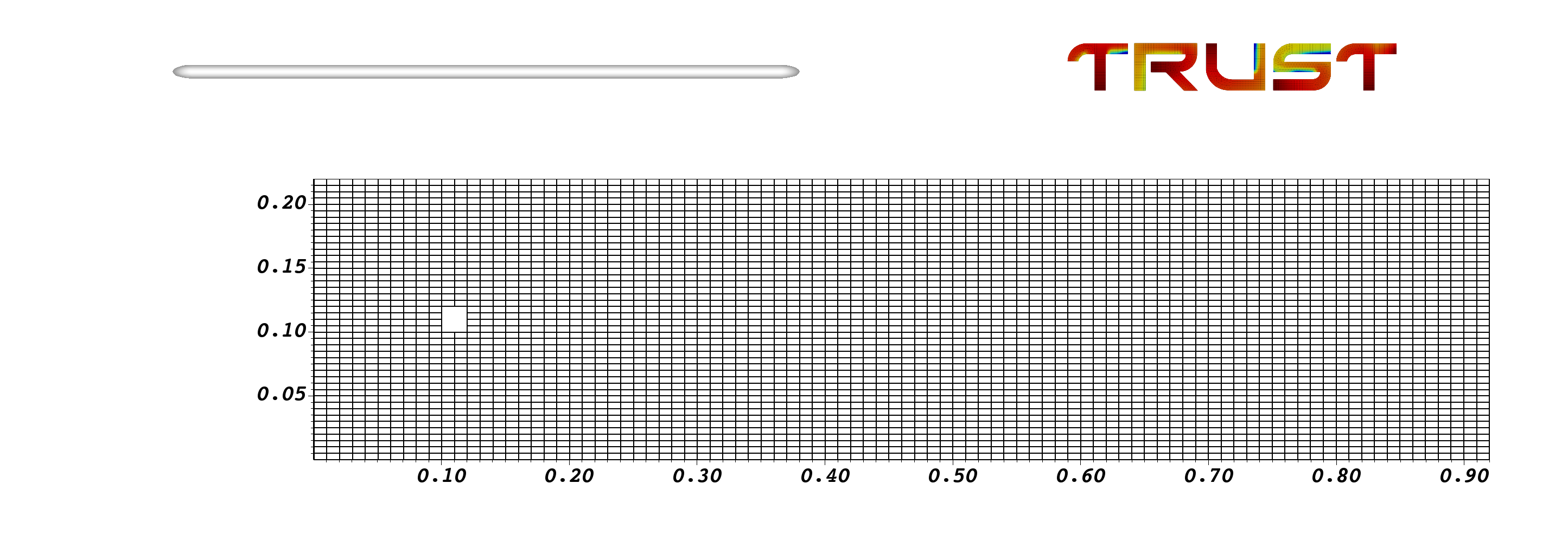
In order to be compliant with this tutorial, you need to name your mesh `Mesh` defined on a domain named `dom` and written in a MED file named `Mesh.med` is used. The MED file should include five boundaries:
- Square: representing the obstacle
- Upper: representing the upper-top boundary
- Lower: representing the lower-bottom boundary
- Inlet: representing the inlet-left boundary
- Outlet: representing the outlet-right boundary
It is important to note the names of all the boundaries because they will need to be specified when imposing boundary conditions. Here is a visualization of the mesh used in the simulation.
 Now, you can start constructing your data file.
You can download the mesh in med format:
```{button-link} ../_static/Mesh.med
:download:
:color: primary
:shadow:
:expand:
📥 Download mesh
```
## Step 3 : Define the domain and read the mesh
You should start by defining the dimension of the domain. In this case it is 2D.
You should create an instance of the `Domaine` class, named dom as that you used in the MED file.
Read the MED file and the mesh using the class `Read_MED`. Since the generated mesh may be somewhat coarse, TRUST allows you to refine it if desired. This can be done via the `Raffiner_isotrope` class applied to your domain `dom`.
Insert the following into `Obstacle.data`:
# Dimension can be 2D or 3D #
dimension 2
# Domain definition #
Domaine dom
# Read the mesh from MED file #
Read_MED { domain dom file Mesh.med }
# Refine the mesh to have better results (optional) #
Raffiner_isotrope dom
## Step 4 : Define the discretization and the problem
The mesh used here allows us to use the VDF discretization. So use the class `VDF` to create an instance with the variable `my_discretization`.
We will solve just the Navier-Stokes (NS) equations, making this a hydraulic problem. Create an instance of `Pb_hydraulique` and name it `pb`.
Insert the following into `Obstacle.data`:
# Discretization on rectangles (hexa), so use VDF #
VDF my_discretization
# Problem definition #
Pb_hydraulique pb
## Step 5 : Define the time integration scheme
You need to define which time scheme to use. Here, we will use the Euler explicit scheme. For that, we create an instance of `Scheme_euler_explicit`, named `my_scheme`, and we read its parameters.
This block contains many parameters; read the comments carefully and insert the block into `Obstacle.data`.
# Define your time scheme; here use explicit #
Scheme_euler_explicit my_scheme
Read my_scheme
{
# Initial time [s] #
tinit 0
# Min time step #
dt_min 5.e-6
# Max time step #
dt_max 5.e-3
# facsec such as dt = facsec * min(dt(CFL),dt_max) ; for explicit scheme facsec <= 1. By default facsec equals to 1 #
facsec 0.5
# Output criteria #
# .out files printing period #
dt_impr 5.e-3 # Note: small value to print at each time step #
# End time [s] of the simulation #
tmax 10.0
}
## Step 6: Associate the instantiated objects
Now, you need to link the domain, the discretization and the time scheme to the problem. This is done by the C++ class `Associate` and `Discretize`.
Insert the following into `Obstacle.data`:
# Association between the different objects #
Associate pb dom /* Associate domain */
Associate pb my_scheme /* Associate time scheme */
Discretize pb my_discretization /* Discretize the domain */
## Step 7: Read the problem (medium, equation, BCs, post-processing)
This is the core step: defining the problem.
Start by defining the incompressible medium `Fluide_incompressible`.
Then, read the Navier-Stokes equation `Navier_Stokes_standard`. Provide the pressure solver `Solveur_pression` and the spatial scheme to be used for the convection operator (here we use the third-order `Quick` scheme).
Specify the initial and boundary conditions. This is done by the `Initial_conditions` and `Boundary_conditions` keywords. Here, we consider that the fluid is at rest at the initial state; so the velocity field is zero. At the boundaries, we consider a no-slip BC at the obstacle borders and symmetry at the top/bottom walls. At the inlet, we fix the horizontal velocity to 1 m/s, while the pressure is fixed at the outlet (open boundary).
Finally, instruct TRUST to write the velocity and vorticity fields for visualization by creating and reading a `Post_processing` object.
Read the syntax and comments carefully, then insert the block into `Obstacle.data`.
# Problem description #
Read pb
{
# Physical characteristics of medium #
Fluide_incompressible
{
# Dynamic viscosity [kg/m/s] #
mu Champ_Uniforme 1 3.7e-05
# Volumic mass [kg/m3] #
rho Champ_Uniforme 1 2
}
# NS equation #
Navier_Stokes_standard
{
# Pressure matrix solved with #
Solveur_pression PETSc Cholesky { }
# Solve the convection operator with a 3rd order QUICK scheme #
Convection { quick }
# Solve the diffusion too; remember diffusion is always 2nd order centered #
Diffusion { }
# Uniform initial condition for velocity #
Initial_conditions { vitesse Champ_Uniforme 2 0. 0. }
# Boundary conditions #
Boundary_conditions
{
Square paroi_fixe
Upper symetrie
Lower symetrie
Outlet frontiere_ouverte_pression_imposee Champ_front_Uniforme 1 0.
Inlet frontiere_ouverte_vitesse_imposee Champ_front_Uniforme 2 1. 0.
}
}
# Post_processing description #
Post_processing
{
# Fields #
format lata
fields dt_post 1.e-2
{
vitesse som
vorticite som
}
}
}
## Step 8 : Solve the problem
End your data file by inserting this block. This will tell TRUST to run and solve the problem.
# The problem is solved with #
Solve pb
Save your `Obstacle.data` file and run the simulation with:
trust Obstacle.data
## Results
Now, you can visualize your results! You should see an animation similar to the one shown below! the well-known Von Kármán vortex street!
Now, you can start constructing your data file.
You can download the mesh in med format:
```{button-link} ../_static/Mesh.med
:download:
:color: primary
:shadow:
:expand:
📥 Download mesh
```
## Step 3 : Define the domain and read the mesh
You should start by defining the dimension of the domain. In this case it is 2D.
You should create an instance of the `Domaine` class, named dom as that you used in the MED file.
Read the MED file and the mesh using the class `Read_MED`. Since the generated mesh may be somewhat coarse, TRUST allows you to refine it if desired. This can be done via the `Raffiner_isotrope` class applied to your domain `dom`.
Insert the following into `Obstacle.data`:
# Dimension can be 2D or 3D #
dimension 2
# Domain definition #
Domaine dom
# Read the mesh from MED file #
Read_MED { domain dom file Mesh.med }
# Refine the mesh to have better results (optional) #
Raffiner_isotrope dom
## Step 4 : Define the discretization and the problem
The mesh used here allows us to use the VDF discretization. So use the class `VDF` to create an instance with the variable `my_discretization`.
We will solve just the Navier-Stokes (NS) equations, making this a hydraulic problem. Create an instance of `Pb_hydraulique` and name it `pb`.
Insert the following into `Obstacle.data`:
# Discretization on rectangles (hexa), so use VDF #
VDF my_discretization
# Problem definition #
Pb_hydraulique pb
## Step 5 : Define the time integration scheme
You need to define which time scheme to use. Here, we will use the Euler explicit scheme. For that, we create an instance of `Scheme_euler_explicit`, named `my_scheme`, and we read its parameters.
This block contains many parameters; read the comments carefully and insert the block into `Obstacle.data`.
# Define your time scheme; here use explicit #
Scheme_euler_explicit my_scheme
Read my_scheme
{
# Initial time [s] #
tinit 0
# Min time step #
dt_min 5.e-6
# Max time step #
dt_max 5.e-3
# facsec such as dt = facsec * min(dt(CFL),dt_max) ; for explicit scheme facsec <= 1. By default facsec equals to 1 #
facsec 0.5
# Output criteria #
# .out files printing period #
dt_impr 5.e-3 # Note: small value to print at each time step #
# End time [s] of the simulation #
tmax 10.0
}
## Step 6: Associate the instantiated objects
Now, you need to link the domain, the discretization and the time scheme to the problem. This is done by the C++ class `Associate` and `Discretize`.
Insert the following into `Obstacle.data`:
# Association between the different objects #
Associate pb dom /* Associate domain */
Associate pb my_scheme /* Associate time scheme */
Discretize pb my_discretization /* Discretize the domain */
## Step 7: Read the problem (medium, equation, BCs, post-processing)
This is the core step: defining the problem.
Start by defining the incompressible medium `Fluide_incompressible`.
Then, read the Navier-Stokes equation `Navier_Stokes_standard`. Provide the pressure solver `Solveur_pression` and the spatial scheme to be used for the convection operator (here we use the third-order `Quick` scheme).
Specify the initial and boundary conditions. This is done by the `Initial_conditions` and `Boundary_conditions` keywords. Here, we consider that the fluid is at rest at the initial state; so the velocity field is zero. At the boundaries, we consider a no-slip BC at the obstacle borders and symmetry at the top/bottom walls. At the inlet, we fix the horizontal velocity to 1 m/s, while the pressure is fixed at the outlet (open boundary).
Finally, instruct TRUST to write the velocity and vorticity fields for visualization by creating and reading a `Post_processing` object.
Read the syntax and comments carefully, then insert the block into `Obstacle.data`.
# Problem description #
Read pb
{
# Physical characteristics of medium #
Fluide_incompressible
{
# Dynamic viscosity [kg/m/s] #
mu Champ_Uniforme 1 3.7e-05
# Volumic mass [kg/m3] #
rho Champ_Uniforme 1 2
}
# NS equation #
Navier_Stokes_standard
{
# Pressure matrix solved with #
Solveur_pression PETSc Cholesky { }
# Solve the convection operator with a 3rd order QUICK scheme #
Convection { quick }
# Solve the diffusion too; remember diffusion is always 2nd order centered #
Diffusion { }
# Uniform initial condition for velocity #
Initial_conditions { vitesse Champ_Uniforme 2 0. 0. }
# Boundary conditions #
Boundary_conditions
{
Square paroi_fixe
Upper symetrie
Lower symetrie
Outlet frontiere_ouverte_pression_imposee Champ_front_Uniforme 1 0.
Inlet frontiere_ouverte_vitesse_imposee Champ_front_Uniforme 2 1. 0.
}
}
# Post_processing description #
Post_processing
{
# Fields #
format lata
fields dt_post 1.e-2
{
vitesse som
vorticite som
}
}
}
## Step 8 : Solve the problem
End your data file by inserting this block. This will tell TRUST to run and solve the problem.
# The problem is solved with #
Solve pb
Save your `Obstacle.data` file and run the simulation with:
trust Obstacle.data
## Results
Now, you can visualize your results! You should see an animation similar to the one shown below! the well-known Von Kármán vortex street!
 Also, check out our **[YouTube](https://www.youtube.com/@ceatrustplatform8802)** channel. Don't forget to like the page! 😜
---
## The complete data file
# Dimension can be 2D or 3D #
dimension 2
# Domain definition #
Domaine dom
# BEGIN MESH #
Read_MED { domain dom file Mesh.med }
raffiner_isotrope dom
# END MESH #
# BEGIN PARTITION
Partition dom
{
/* Choose Nb_parts so to have ~ 25000 cells per processor */
Partition_tool metis { nb_parts 2 }
Larg_joint 2
zones_name DOM
}
End
END PARTITION #
# BEGIN SCATTER
Scatter DOM.Zones dom
END SCATTER #
# Discretization on hexa or tetra mesh #
VDF my_discretization
# Problem definition #
Pb_hydraulique pb
# Time scheme explicit or implicit #
Scheme_euler_explicit my_scheme
Read my_scheme
{
# Initial time [s] #
tinit 0
# Min time step #
dt_min 5.e-6
# Max time step #
dt_max 5.e-3 # dt_min = dt_max so dt imposed #
# facsec such as dt = facsec * min(dt(CFL),dt_max) ; for explicit scheme facsec <= 1. By default facsec equals to 1 #
facsec 0.5
# make the diffusion term in NS equation implicit : disable(0) or enable(1) #
diffusion_implicite 0
# Output criteria #
# .out files printing period #
dt_impr 5.e-3 # Note: small value to print at each time step #
# .sauv files printing period #
dt_sauv 100
periode_sauvegarde_securite_en_heures 23
# Stop if one of the following criteria is met: #
# End time [s] #
tmax 10.0
# Max number of time steps #
# nb_pas_dt_max 3 #
# Convergence threshold (see .dt_ev file) #
seuil_statio 1.e-8
}
# Association between the different objects #
Associate pb dom
Associate pb my_scheme
Discretize pb my_discretization
# Problem description #
Read pb
{
# Physical characteristics of medium #
fluide_incompressible
{
# Dynamic viscosity [kg/m/s] #
mu Champ_Uniforme 1 3.7e-05
# Volumic mass [kg/m3] #
rho Champ_Uniforme 1 2
}
# NS equation #
Navier_Stokes_standard
{
# Pressure matrix solved with #
/* solveur_pression GCP
{
precond ssor { omega 1.500000 }
seuil 1.000000e-06
impr
} */
solveur_pression Cholesky { }
# Two operators are defined #
convection { quick }
diffusion { }
# Uniform initial condition for velocity #
initial_conditions { vitesse Champ_Uniforme 2 0. 0. }
# Boundary conditions #
boundary_conditions
{
Square paroi_fixe
Upper symetrie
Lower symetrie
Outlet frontiere_ouverte_pression_imposee Champ_front_Uniforme 1 0.
Inlet frontiere_ouverte_vitesse_imposee Champ_front_Uniforme 2 1. 0.
}
}
# Post_processing description #
Post_processing
{
# Probes #
Probes
{
# Note: period with small value to print at each time step (necessary for spectral analysis) #
sonde_pression pression periode 0.005 points 2 0.13 0.105 0.13 0.115
sonde_vitesse vitesse periode 0.005 points 2 0.14 0.105 0.14 0.115
sonde_vit vitesse periode 0.005 segment 22 0.14 0.0 0.14 0.22
sonde_P pression periode 0.01 plan 23 11 0.01 0.005 0.91 0.005 0.01 0.21
/* sonde_Pmoy Moyenne_pression periode 0.005 points 2 0.13 0.105 0.13 0.115
sonde_Pect Ecart_type_pression periode 0.005 points 2 0.13 0.105 0.13 0.115 */
}
# Fields #
format lata
fields dt_post 1.e-2 # Note: be mindful of memory usage if dt_post is too small #
{
/* pression elem
pression som
vitesse elem
vitesse som */
vorticite som
}
# Statistical fields #
/* Statistiques dt_post 1.
{
t_deb 1. t_fin 5.
moyenne vitesse
ecart_type vitesse
moyenne pression
ecart_type pression
} */
}
# Saving and restarting process #
/* resume_last_time binaire datafile.sauv */
}
# The problem is solved with #
Solve pb
# Not necessary keyword to finish #
End
Also, check out our **[YouTube](https://www.youtube.com/@ceatrustplatform8802)** channel. Don't forget to like the page! 😜
---
## The complete data file
# Dimension can be 2D or 3D #
dimension 2
# Domain definition #
Domaine dom
# BEGIN MESH #
Read_MED { domain dom file Mesh.med }
raffiner_isotrope dom
# END MESH #
# BEGIN PARTITION
Partition dom
{
/* Choose Nb_parts so to have ~ 25000 cells per processor */
Partition_tool metis { nb_parts 2 }
Larg_joint 2
zones_name DOM
}
End
END PARTITION #
# BEGIN SCATTER
Scatter DOM.Zones dom
END SCATTER #
# Discretization on hexa or tetra mesh #
VDF my_discretization
# Problem definition #
Pb_hydraulique pb
# Time scheme explicit or implicit #
Scheme_euler_explicit my_scheme
Read my_scheme
{
# Initial time [s] #
tinit 0
# Min time step #
dt_min 5.e-6
# Max time step #
dt_max 5.e-3 # dt_min = dt_max so dt imposed #
# facsec such as dt = facsec * min(dt(CFL),dt_max) ; for explicit scheme facsec <= 1. By default facsec equals to 1 #
facsec 0.5
# make the diffusion term in NS equation implicit : disable(0) or enable(1) #
diffusion_implicite 0
# Output criteria #
# .out files printing period #
dt_impr 5.e-3 # Note: small value to print at each time step #
# .sauv files printing period #
dt_sauv 100
periode_sauvegarde_securite_en_heures 23
# Stop if one of the following criteria is met: #
# End time [s] #
tmax 10.0
# Max number of time steps #
# nb_pas_dt_max 3 #
# Convergence threshold (see .dt_ev file) #
seuil_statio 1.e-8
}
# Association between the different objects #
Associate pb dom
Associate pb my_scheme
Discretize pb my_discretization
# Problem description #
Read pb
{
# Physical characteristics of medium #
fluide_incompressible
{
# Dynamic viscosity [kg/m/s] #
mu Champ_Uniforme 1 3.7e-05
# Volumic mass [kg/m3] #
rho Champ_Uniforme 1 2
}
# NS equation #
Navier_Stokes_standard
{
# Pressure matrix solved with #
/* solveur_pression GCP
{
precond ssor { omega 1.500000 }
seuil 1.000000e-06
impr
} */
solveur_pression Cholesky { }
# Two operators are defined #
convection { quick }
diffusion { }
# Uniform initial condition for velocity #
initial_conditions { vitesse Champ_Uniforme 2 0. 0. }
# Boundary conditions #
boundary_conditions
{
Square paroi_fixe
Upper symetrie
Lower symetrie
Outlet frontiere_ouverte_pression_imposee Champ_front_Uniforme 1 0.
Inlet frontiere_ouverte_vitesse_imposee Champ_front_Uniforme 2 1. 0.
}
}
# Post_processing description #
Post_processing
{
# Probes #
Probes
{
# Note: period with small value to print at each time step (necessary for spectral analysis) #
sonde_pression pression periode 0.005 points 2 0.13 0.105 0.13 0.115
sonde_vitesse vitesse periode 0.005 points 2 0.14 0.105 0.14 0.115
sonde_vit vitesse periode 0.005 segment 22 0.14 0.0 0.14 0.22
sonde_P pression periode 0.01 plan 23 11 0.01 0.005 0.91 0.005 0.01 0.21
/* sonde_Pmoy Moyenne_pression periode 0.005 points 2 0.13 0.105 0.13 0.115
sonde_Pect Ecart_type_pression periode 0.005 points 2 0.13 0.105 0.13 0.115 */
}
# Fields #
format lata
fields dt_post 1.e-2 # Note: be mindful of memory usage if dt_post is too small #
{
/* pression elem
pression som
vitesse elem
vitesse som */
vorticite som
}
# Statistical fields #
/* Statistiques dt_post 1.
{
t_deb 1. t_fin 5.
moyenne vitesse
ecart_type vitesse
moyenne pression
ecart_type pression
} */
}
# Saving and restarting process #
/* resume_last_time binaire datafile.sauv */
}
# The problem is solved with #
Solve pb
# Not necessary keyword to finish #
End