|
TRUST 1.9.8
HPC thermohydraulic platform
|

|
TRUST 1.9.8
HPC thermohydraulic platform
|
This tutorial describes the steps to follow when building a BALTIK application on top of the TRUST software.
To this end, a convection-diffusion equation is chosen as a working example of a mathematical problem to solve. In this equation, the convection velocity and the diffusion coefficient are user-provided inputs.
The development specifications are described and some recommendations are given for solving this convection-diffusion equation. The developments are then carried out within an environment provided by the TRUST software called a BALTIK application, whose setup is also described.
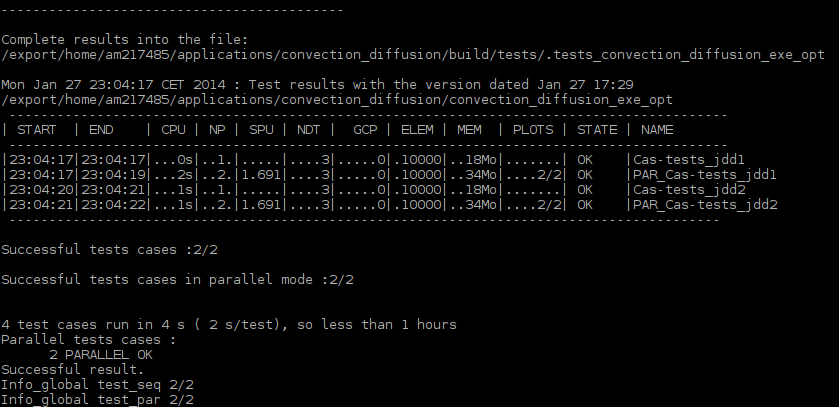
Finally, two verification and non-regression tests are performed using the tools provided by the TRUST software (genererCourbes, make check_optim).
This tutorial aims to describe the steps to follow when building a BALTIK application on top of the TRUST software. To this end, the following convection-diffusion equation is chosen as a working example:
\[\frac{\partial c}{\partial t}+\nabla\cdot(\overrightarrow{V}c)+\nabla\cdot(D\nabla c)=0 \quad \textrm{on } \Omega=[a,b]\times[c,d] \]
with periodic boundary conditions, where:
The spatial and temporal discretization of the convection-diffusion equation will be performed using the numerical schemes available in the TRUST software.
In the Specification section, we describe the development specifications and give some recommendations for solving this equation.
The developments specified in the Specification section are described in the Developments section. These developments will be carried out within a BALTIK application environment, whose setup is also described in that section.
The Development Verification Process section is dedicated to two verification and non-regression tests using the tools provided by the TRUST software (genererCourbes, make check_optim).
Equation concept: the role of an equation is to compute one or more fields given the following choices:
An equation is carried by a problem and holds a back-reference to the problem that owns it.
In our case, the problem to be solved contains a single convection-diffusion equation composed of:
When developing applications based on the TRUST software, it is recommended to start the specification by writing the input data file. This recommendation stems from the fact that the keywords in the TRUST input data file correspond to C++ objects (classes). Starting from the data file thus serves, on one hand, to adopt a user perspective and, on the other hand, to identify the objects (problem, equation(s), ...) that need to be specified and developed.
The parts of the input data file specific to our problem are described below.
Problem declaration
This new problem will be named Probleme_Convection_Diffusion.
Convection-diffusion equation declaration
This new equation will be named Convection_Diffusion. It is composed of two operators (convection and diffusion), initial conditions, and boundary conditions.
User inputs
For the convection-diffusion equation, the convection velocity \(\overrightarrow{V}(\overrightarrow{X},t)\) and the diffusion coefficient \(D(\overrightarrow{X},t)\) are provided by the user. In TRUST development practice, these parameters must be associated with an object (equation, problem, ...) in the data file. They will be named coefficient_diffusion and vitesse_convection.
Post-processing
It is useful to post-process the quantity of interest \(c\), the convection velocity \(\overrightarrow{V}(\overrightarrow{X},t)\), and the diffusion coefficient \(D(\overrightarrow{X},t)\). The post-processing block for these variables takes the following form:
It is strongly recommended to make maximum use of the existing features in the TRUST software and to avoid duplicating code. This minimises development time on one hand, and allows the application to benefit from the test coverage of the TRUST software on the other.
Features can be identified through the Doxygen documentation of the TRUST software. We carry out this identification exercise below with respect to our requirements described in the Input Data File — Requirements Analysis section.
Problem
By examining the Doxygen graph of the Probleme_base class (figure below), no existing problem appears close enough to our needs.

Convection-diffusion equation
By examining the Doxygen graph of the Equation_base class, we find that a convection-diffusion equation named Convection_Diffusion_std exists. It is a base class for the transport equation of a scalar in laminar flow and holds a reference to the convecting velocity field. This equation class is pure abstract and therefore cannot be instantiated. Its implementation is incomplete and serves as a base for other derived classes.
Based on the Doxygen graph of the Convection_Diffusion_Concentration class (figure below), the child class Convection_Diffusion_Concentration, derived from Convection_Diffusion_std, appears very close to the convection-diffusion equation. This class is a specific case of Convection_Diffusion_std for the transport of one or more constituents.
The specificities of the Convection_Diffusion_Concentration equation are:
The analysis of the TRUST software features in the previous section identified a Convection_Diffusion_Concentration equation that is very close to the convection-diffusion equation, with a user-supplied diffusion coefficient provided through a constituent. We therefore choose to use this equation as a base to develop a new equation named Convection_Diffusion, and associate with it a new constituent Constituant_Avec_Vitesse derived from the existing one, extended with a convection velocity property.
The new constituent class Constituant_Avec_Vitesse will be declared in the data file as follows:
A BALTIK application development environment is available for applications built on top of either the TRUST software, its numerical kernel ("Kernel"), or another BALTIK application. This environment handles the compilation of such applications (application-specific sources) as well as modified and/or added TRUST sources. In this framework, an application consists of:
In practice, the application-specific sources are gathered in a working directory called src, which is compiled following the standard TRUST compilation process. Sources from the "Kernel" or from TRUST that need to be modified from their standard versions can also be included.
Creating a BALTIK application consists in creating a directory named after the application (e.g. convection_diffusion).
Setting up a BALTIK application involves creating a configuration file project.cfg inside the convection_diffusion directory.
To configure our BALTIK application, the following steps must be executed:
initialise the source directory:
src is the directory containing either modified TRUST or Kernel TRUST sources, or additional sources specific to our application.
configure the BALTIK application:
The $TRUST_ROOT environment variable is the path where the TRUST software is installed. The first instruction initialises the TRUST environment. The second generates a configure file and must be run from the convection_diffusion directory.
The Makefile is generated by running the following instruction from the convection_diffusion directory:
Once the Makefile has been generated, two compilation modes are available:
debug mode:
optimised mode:
As specified in the Specification section, the user parameters for convection velocity and diffusion coefficient are assigned to the new constituent class Constituant_Avec_Vitesse, which inherits from the Constituant class of the TRUST software. The distinguishing feature of this new class is that it holds a convection velocity field.
Handling this additional attribute requires the following actions:
In the source file, the Implemente_instanciable macro serves, on one hand, to define the keyword used in the data file to represent the Constituant_Avec_Vitesse class, and on the other hand, to declare its parent class. In our case, the class name Constituant_Avec_Vitesse is chosen as the keyword in the data file.
The distinguishing feature of this new equation class Convection_Diffusion compared to the base class Convection_Diffusion_Concentration is that Convection_Diffusion holds a reference to the new constituent class Constituant_Avec_Vitesse, and the convection velocity is provided by that class rather than by the resolution of a Navier-Stokes hydraulics equation.
Handling this new reference requires the following actions:
In the Specification section, no existing problem was identified as a suitable base for the new Probleme_Convection_Diffusion problem. We therefore take the pure abstract class Probleme_base as the parent class.
To use this new problem class, the following steps are required:
In this section, we present:
Setting up the verification tests involves creating:
a directory for each verification test:
Cas-tests is the directory containing the verification tests. cas-test1 and cas-test2 contain the two verification cases.
Generation consists in running the command make validation from the convection_diffusion directory. In that same directory, this command will produce the verification report validation.pdf. This report is presented in the Verification Report section below.
To use the previously set up tests as non-regression tests, it suffices to:
create a directory to hold the reference results inside the convection_diffusion directory:
In this tutorial, we have described, through the resolution of a convection-diffusion equation, the following aspects:
 1.16.1