|
TRUST 1.9.8
HPC thermohydraulic platform
|

|
TRUST 1.9.8
HPC thermohydraulic platform
|
In this section, we will recreate step by step the data file used in a previous tutorial.
Create an empty data file named Obstacle.data in an empty Obstacle directory.
Prepare a meshed domain that will be used in the simulation. You can use the Salome software to do so.
In order to be compliant with this tutorial, you need to name your mesh Mesh defined on a domain named dom and written in a MED file named Mesh.med is used. The MED file should include five boundaries:
It is important to note the names of all the boundaries because they will need to be specified when imposing boundary conditions. Here is a visualization of the mesh used in the simulation.
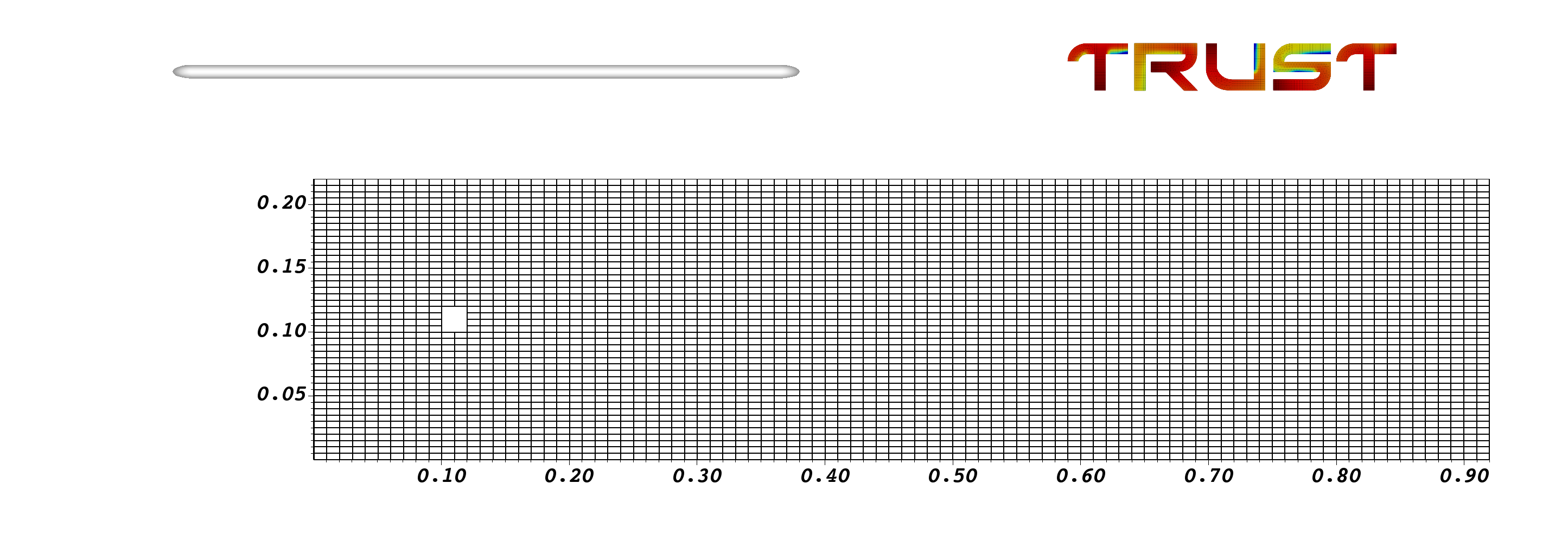
Now, you can start constructing your data file.
You should start by defining the dimension of the domain. In this case it is 2D.
You should create an instance of the Domaine class, named dom as that you used in the MED file.
Read the MED file and the mesh using the class Read_MED. Since the generated mesh may be somewhat coarse, TRUST allows you to refine it if desired. This can be done via the Raffiner_isotrope class applied to your domain dom.
Insert the following into Obstacle.data:
# Dimension can be 2D or 3D #
dimension 2

# Domain definition #
Domaine dom

# Read the mesh from MED file #
Read_MED { domain dom file Mesh.med }

# Refine the mesh to have better results (optional) #
Raffiner_isotrope dom
The mesh used here allows us to use the VDF discretization. So use the class VDF to create an instance with the variable my_discretization.
We will solve just the Navier-Stokes (NS) equations, making this a hydraulic problem. Create an instance of Pb_hydraulique and name it pb.
Insert the following into Obstacle.data:
# Discretization on rectangles (hexa), so use VDF #
VDF my_discretization

# Problem definition #
Pb_hydraulique pb
You need to define which time scheme to use. Here, we will use the Euler explicit scheme. For that, we create an instance of Scheme_euler_explicit, named my_scheme, and we read its parameters.
This block contains many parameters; read the comments carefully and insert the block into Obstacle.data.
# Define your time scheme; here use explicit #
Scheme_euler_explicit my_scheme
Read my_scheme
{
    # Initial time [s] #
    tinit 0

    # Min time step #
    dt_min 5.e-6

    # Max time step #
    dt_max 5.e-3

    # facsec such as dt = facsec * min(dt(CFL),dt_max) ; for explicit scheme facsec <= 1. By default facsec equals to 1 #
    facsec 0.5

    # Output criteria #
    # .out files printing period #
    dt_impr 5.e-3 # Note: small value to print at each time step #

    # End time [s] of the simulation #
    tmax 10.0
}
Now, you need to link the domain, the discretization and the time scheme to the problem. This is done by the C++ class Associate and Discretize.
Insert the following into Obstacle.data:
# Association between the different objects #
Associate pb dom /* Associate domain */
Associate pb my_scheme /* Associate time scheme */
Discretize pb my_discretization /* Discretize the domain */
This is the core step: defining the problem.
Start by defining the incompressible medium Fluide_incompressible.
Then, read the Navier-Stokes equation Navier_Stokes_standard. Provide the pressure solver Solveur_pression and the spatial scheme to be used for the convection operator (here we use the third-order Quick scheme).
Specify the initial and boundary conditions. This is done by the Initial_conditions and Boundary_conditions keywords. Here, we consider that the fluid is at rest at the initial state; so the velocity field is zero. At the boundaries, we consider a no-slip BC at the obstacle borders and symmetry at the top/bottom walls. At the inlet, we fix the horizontal velocity to 1 m/s, while the pressure is fixed at the outlet (open boundary).
Finally, instruct TRUST to write the velocity and vorticity fields for visualization by creating and reading a Post_processing object.
Read the syntax and comments carefully, then insert the block into Obstacle.data.
# Problem description #
Read pb
{
    # Physical characteristics of medium #
    Fluide_incompressible
    {
        # Dynamic viscosity [kg/m/s] #
        mu Champ_Uniforme 1 3.7e-05
        # Volumic mass [kg/m3] #
        rho Champ_Uniforme 1 2
    }

    # NS equation #
    Navier_Stokes_standard
    {
        # Pressure matrix solved with #
        Solveur_pression PETSc Cholesky { }

        # Solve the convection operator with a 3rd order QUICK scheme #
        Convection { quick }

        # Solve the diffusion too; remember diffusion is always 2nd order centered #
        Diffusion { }

        # Uniform initial condition for velocity #
        Initial_conditions { vitesse Champ_Uniforme 2 0. 0. }

        # Boundary conditions #
        Boundary_conditions
        {
            Square  paroi_fixe
            Upper   symetrie
            Lower   symetrie
            Outlet  frontiere_ouverte_pression_imposee Champ_front_Uniforme 1 0.
            Inlet   frontiere_ouverte_vitesse_imposee Champ_front_Uniforme 2 1. 0.
        }
    }

    # Post_processing description #
    Post_processing
    {
        # Fields #
        format lata
        fields dt_post 1.e-2
        {
            vitesse som
            vorticite som
        }
    }
}
End your data file by inserting this block. This will tell TRUST to run and solve the problem.
# The problem is solved with #
Solve pb
Save your Obstacle.data file and run the simulation with:
trust Obstacle.data
Now, you can visualize your results! You should see an animation similar to the one shown below! the well-known Von Kármán vortex street!

Also, check out our **YouTube** channel.
# Dimension can be 2D or 3D #
dimension 2

# Domain definition #
Domaine dom

# BEGIN MESH #
Read_MED { domain dom file Mesh.med }
raffiner_isotrope dom
# END MESH #

# BEGIN PARTITION
Partition dom
{
    /* Choose Nb_parts so to have ~ 25000 cells per processor */
    Partition_tool metis { nb_parts 2 }
    Larg_joint 2
    zones_name DOM
}
End
END PARTITION #

# BEGIN SCATTER
Scatter DOM.Zones dom
END SCATTER #

# Discretization on hexa or tetra mesh #
VDF my_discretization

# Problem definition #
Pb_hydraulique pb

# Time scheme explicit or implicit #
Scheme_euler_explicit my_scheme
Read my_scheme
{
    # Initial time [s] #
    tinit 0

    # Min time step #
    dt_min 5.e-6

    # Max time step #
    dt_max 5.e-3 # dt_min = dt_max so dt imposed #

    # facsec such as dt = facsec * min(dt(CFL),dt_max) ; for explicit scheme facsec <= 1. By default facsec equals to 1 #
    facsec 0.5

    # make the diffusion term in NS equation implicit : disable(0) or enable(1) #
    diffusion_implicite 0

    # Output criteria #
    # .out files printing period #
    dt_impr 5.e-3 # Note: small value to print at each time step #

    # .sauv files printing period #
    dt_sauv 100
    periode_sauvegarde_securite_en_heures 23

    # Stop if one of the following criteria is met: #
    # End time [s] #
    tmax 10.0

    # Max number of time steps #
    # nb_pas_dt_max 3 #

    # Convergence threshold (see .dt_ev file) #
    seuil_statio 1.e-8
}

# Association between the different objects #
Associate pb dom
Associate pb my_scheme
Discretize pb my_discretization

# Problem description #
Read pb
{

    # Physical characteristics of medium #
    fluide_incompressible
    {
        # Dynamic viscosity [kg/m/s] #
        mu Champ_Uniforme 1 3.7e-05
        # Volumic mass [kg/m3] #
        rho Champ_Uniforme 1 2
    }

    # NS equation #
    Navier_Stokes_standard
    {
        # Pressure matrix solved with #
        /* solveur_pression GCP
        {
            precond ssor { omega 1.500000 }
            seuil 1.000000e-06
            impr
        } */
        solveur_pression Cholesky { }

        # Two operators are defined #
        convection { quick }
        diffusion { }

        # Uniform initial condition for velocity #
        initial_conditions { vitesse Champ_Uniforme 2 0. 0. }

        # Boundary conditions #
        boundary_conditions
        {
            Square  paroi_fixe
            Upper   symetrie
            Lower   symetrie
            Outlet  frontiere_ouverte_pression_imposee Champ_front_Uniforme 1 0.
            Inlet   frontiere_ouverte_vitesse_imposee Champ_front_Uniforme 2 1. 0.
        }
    }

    # Post_processing description #
    Post_processing
    {
        # Probes #
        Probes
        {
            # Note: period with small value to print at each time step (necessary for spectral analysis) #
            sonde_pression pression periode 0.005 points 2 0.13 0.105 0.13 0.115
            sonde_vitesse vitesse periode 0.005 points 2 0.14 0.105 0.14 0.115
            sonde_vit vitesse periode 0.005 segment 22 0.14 0.0 0.14 0.22
            sonde_P pression periode 0.01 plan 23 11 0.01 0.005 0.91 0.005 0.01 0.21
            /* sonde_Pmoy Moyenne_pression periode 0.005 points 2 0.13 0.105 0.13 0.115
            sonde_Pect Ecart_type_pression periode 0.005 points 2 0.13 0.105 0.13 0.115 */
        }

        # Fields #
        format lata
        fields dt_post 1.e-2  # Note: be mindful of memory usage if dt_post is too small #
        {
            /* pression elem
            pression som
            vitesse elem
            vitesse som */
            vorticite som
        }

        # Statistical fields #
        /* Statistiques dt_post 1.
        {
            t_deb 1. t_fin 5.
            moyenne vitesse
            ecart_type vitesse
            moyenne pression
            ecart_type pression
        } */
    }

    # Saving and restarting process #
    /* resume_last_time binaire datafile.sauv */
}

# The problem is solved with #
Solve pb

# Not necessary keyword to finish #
End
 1.16.1