
Building another BALTIK#
Abstract#
This tutorial aims to describe the steps to follow when building a BALTIK application on top of the TRUST software.
To this end, a convection-diffusion equation is chosen as a working example of a mathematical problem to solve. In this equation, the convection velocity and the diffusion coefficient are user-provided inputs.
In particular, the development specifications are described and some recommendations are given for solving this convection-diffusion equation.
The developments are then described and carried out within an environment provided by the TRUST software called a BALTIK application. The setup of this environment is also described.
Finally, two verification and non-regression tests are performed using the tools provided by the TRUST software (genererCourbes, make check_optim).
Introduction#
This tutorial aims to describe the steps to follow when building a BALTIK application on top of the TRUST software.
To this end, the convection-diffusion equation below is chosen as a working example of a mathematical problem to solve:
with periodic boundary conditions, where:
\(c(\overrightarrow{X},t)\): quantity of interest (species concentration, temperature, …),
\(\overrightarrow{V}(\overrightarrow{X},t)\): convection velocity of \(c\) (user input),
\(D(\overrightarrow{X},t)\): diffusion coefficient of \(c\) (user input),
\(a\), \(b\), \(c\) and \(d\): bounds of the two-dimensional computational domain.
The spatial and temporal discretisation of equation (10) will be performed using the numerical schemes available in the TRUST software.
In the Specification section, we describe the development specifications and give some recommendations for solving equation (10).
The developments specified in the Specification section are described in the Developments section. These developments will be carried out within an environment provided by the TRUST software called a BALTIK application. The setup of this environment is also described in that section.
The Development Verification Process section is dedicated to two verification and non-regression tests using the tools provided by the TRUST software (genererCourbes, make check_optim).
Specification#
Concepts#
Problem concept: the role of a problem is to solve, over a domain, the equations that make up the problem. A time discretisation scheme and a space discretisation scheme are associated with it.
Equation concept: the role of an equation is to compute one or more fields given the following choices:
a time discretisation scheme,
a space discretisation scheme,
boundary conditions,
source terms and operators.
An equation is carried by a problem and holds a back-reference to the problem that owns it.
Operator concept: operators are parts of an equation. Among the most commonly used operators are the convection and diffusion operators.
Medium concept: description of the fluid or solid medium being modelled. The medium is defined within the problem and is accessible to the equations. The properties that characterise the medium include:
density,
diffusivity,
thermal conductivity,
heat capacity,
variation of density with temperature (thermal expansion).
In our case, the problem to be solved contains a single equation (10). This equation is composed of:
an unsteady term \(\frac{\partial c}{\partial t}\),
a convection operator \(\nabla\cdot(\overrightarrow{V}c)\),
a diffusion operator \(\nabla\cdot(D\nabla c)\),
a source or sink term \(f=0\).
Input Data File - Requirements Analysis#
When developing applications based on the TRUST software, it is recommended to start the specification by writing the input data file. This recommendation stems from the fact that the keywords in the TRUST input data file correspond to C++ objects (classes). Starting from the data file thus serves, on one hand, to adopt a user perspective and, on the other hand, to identify the objects (problem, equation(s), …) that need to be specified and developed.
The parts of the input data file specific to our problem are described below:
Problem declaration
This new problem will be named
Probleme_Convection_Diffusion.Convection-diffusion equation declaration
This new equation will be named
Convection_Diffusion. It is composed of two operators (convection and diffusion), initial conditions, and boundary conditions.User inputs
For equation (10), the convection velocity \(\overrightarrow{V}(\overrightarrow{X},t)\) and the diffusion coefficient \(D(\overrightarrow{X},t)\) are provided by the user. In TRUST development practice, these parameters must be associated with an object (equation, problem, …) in the data file. They will be named
coefficient_diffusionandvitesse_convection.Post-processing
It is useful to post-process the quantity of interest \(c\), the convection velocity \(\overrightarrow{V}(\overrightarrow{X},t)\), and the diffusion coefficient \(D(\overrightarrow{X},t)\). The post-processing block for these variables takes the following form:
TRUST Built-in Features#
It is strongly recommended to make maximum use of the existing features in the TRUST software and to avoid duplicating code. This minimises development time on one hand, and allows the application to benefit from the test coverage of the TRUST software on the other.
Features can be identified through the doxygen documentation of the TRUST software. We carry out this identification exercise below with respect to our requirements described in the Input Data File - Requirements Analysis section.
problem
By examining the doxygen graph of the
Probleme_baseclass (cf. Figure 27), no existing problem appears close enough to our needs.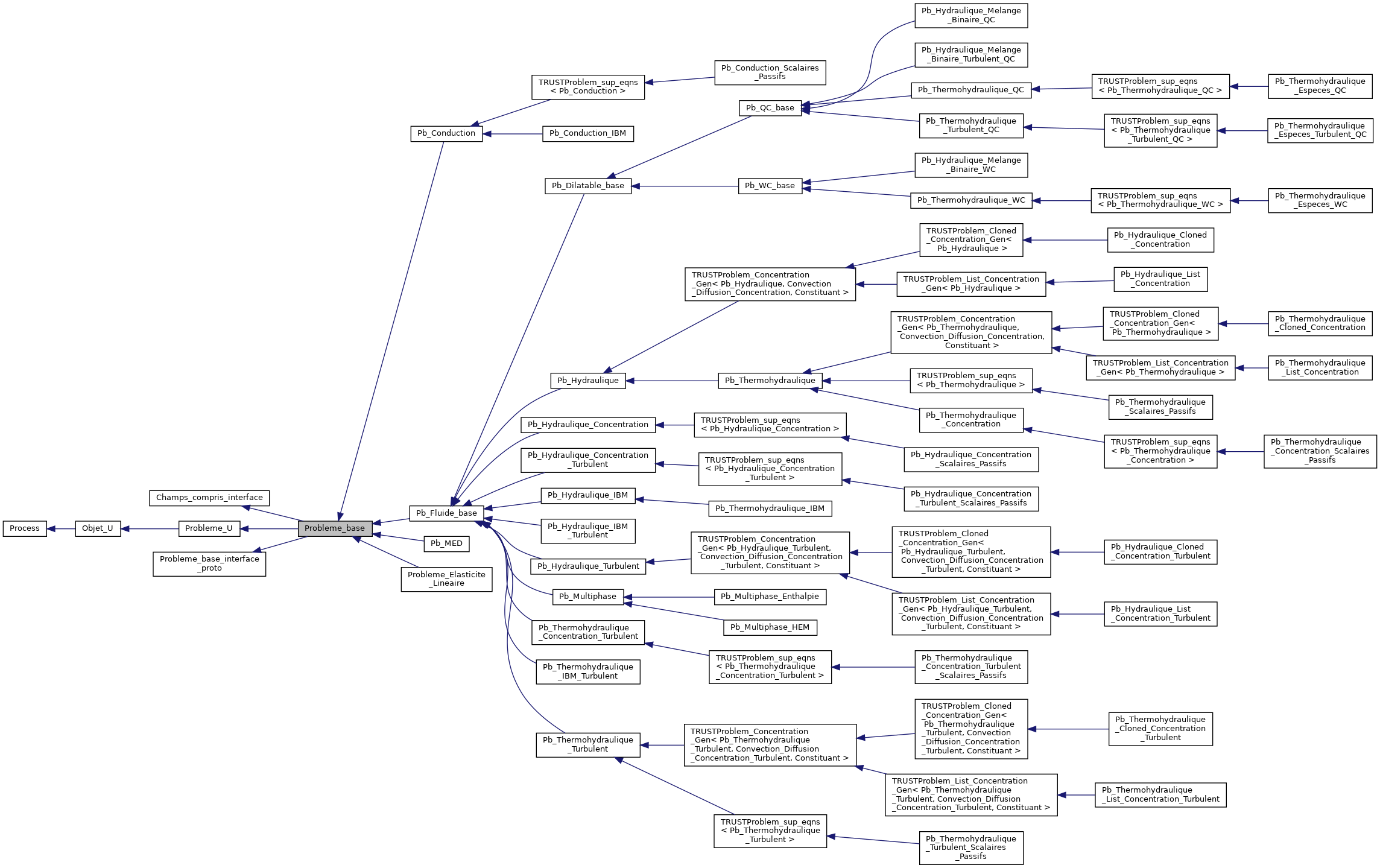
Figure 27
Probleme_baseclass#convection-diffusion equation
By examining the doxygen graph of the
Equation_baseclass (cf. Figure 28), we find that a convection-diffusion equation namedConvection_Diffusion_stdexists (cf. Figure 29). It is a base class for the transport equation of a scalar in laminar flow and holds a reference to the convecting velocity field. This equation class is pure abstract and therefore cannot be instantiated. Its implementation is incomplete and serves as a base for other derived classes.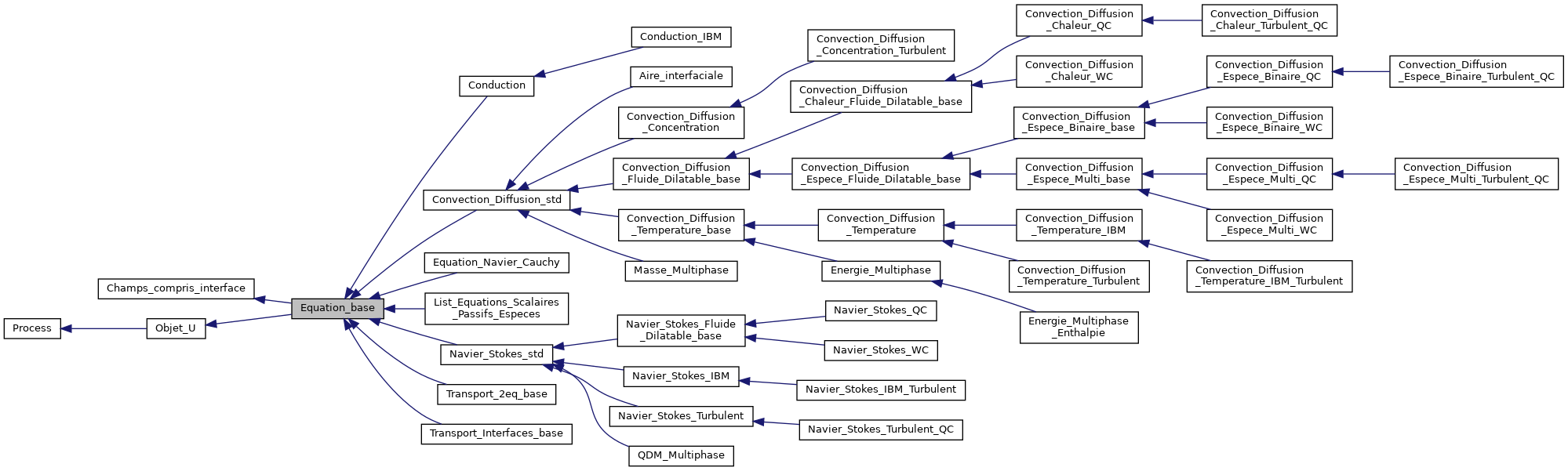
Figure 28
Equation_baseclass#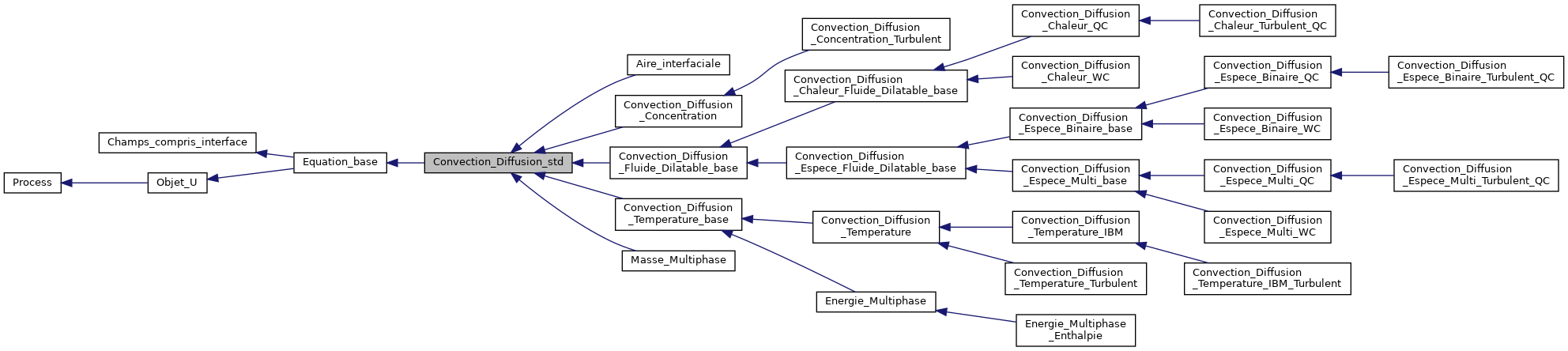
Figure 29
Convection_Diffusion_stdclass#Based on the doxygen graph of the
Convection_Diffusion_Concentrationclass (cf. Figure 30), the child classConvection_Diffusion_Concentration, derived fromConvection_Diffusion_std, appears very close to equation (10). This class is a specific case ofConvection_Diffusion_stdfor the transport of one or more constituents.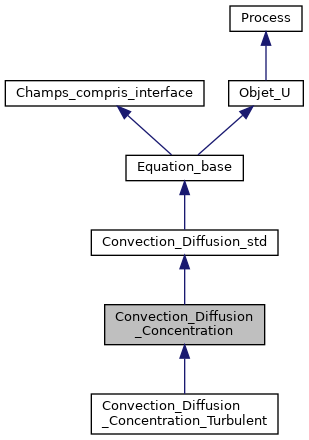
Figure 30
Convection_Diffusion_Concentrationclass#The specificities of the
Convection_Diffusion_Concentrationequation are:diffusion coefficient: this coefficient is a property of a constituent associated with the equation. It is provided by the user in the data file as follows:
convection velocity: this velocity is obtained via the
vitesse_pour_transportmethod, which retrieves it from the equation of the problem that owns it. In standard TRUST usage, this convection velocity comes from the Navier-Stokes hydraulics equation.
Application-Specific Features#
The analysis of the TRUST software features in the previous section identified a Convection_Diffusion_Concentration equation that is very close to equation (10), with a user-supplied diffusion coefficient provided through a constituent. We therefore choose to use this equation as a base to develop a new equation named Convection_Diffusion, and associate with it a new constituent Constituant_Avec_Vitesse derived from the existing one, extended with a convection velocity property.
The new constituent class Constituant_Avec_Vitesse will be declared in the data file as follows:
Developments#
Development Environment: BALTIK Application#
A BALTIK application development environment is available for applications built on top of either the TRUST software, its numerical kernel (« Kernel »), or another BALTIK application. This environment handles the compilation of such applications (application-specific sources) as well as modified and/or added TRUST sources.
In this framework, an application consists of:
the numerical « Kernel », the TRUST software, or another
BALTIKapplication,the application-specific sources.
In practice, the application-specific sources are gathered in a working directory called src1The location of the src directory in the BALTIK application tree is described in the Creating and Configuring the BALTIK Application section., which is compiled following the standard TRUST compilation process. Sources from the « Kernel » or from TRUST that need to be modified from their standard versions can also be included.
Creating and Configuring the BALTIK Application#
Creating a BALTIK application consists in creating a directory named after the application (e.g. convection_diffusion).
$ mkdir convection_diffusion
Setting up a BALTIK application involves creating a configuration file project.cfg inside the convection_diffusion directory.
In this configuration file, only the application name is mandatory. However, a number of optional parameters exist, such as the author name, the name of the executable to generate, etc.
To configure our BALTIK application, the following steps must be executed:
initialise the software environment:
$ cd convection_diffusion
$ mkdir src
srcis the directory containing either modified TRUST or Kernel TRUST sources, or additional sources specific to our application.configure the
BALTIKapplication:$ source $TRUST_ROOT/env_TRUST.sh $ cd convection_diffusion $ baltik_build_configure
The
$TRUST_ROOTenvironment variable is the path where the TRUST software is installed. The first instruction initialises the TRUST environment. The second instruction generates aconfigurefile. It is important to note that this instruction must be run from theconvection_diffusiondirectory.
Compiling the BALTIK Application#
Compiling our BALTIK application is fairly standard. The Makefile is generated by running the following instruction from the convection_diffusion directory:
$ cd convection_diffusion
$ ./configure
Note
When new sources are added to the src directory, this instruction must be re-run to update the Makefile.
Once the Makefile has been generated, two compilation modes are available for the BALTIK application:
debug mode:
$ cd convection_diffusion
$ make debug
optimised mode:
$ cd convection_diffusion
$ make optim
Constituent Class Constituant_Avec_Vitesse#
As specified in the Specification section, the user parameters for convection velocity and diffusion coefficient are assigned to the new constituent class Constituant_Avec_Vitesse, which inherits from the Constituant class of the TRUST software. The distinguishing feature of this new class is that it holds a convection velocity field.
Handling this additional attribute requires the following actions:
adding attributes:
C: will hold the content ofvitesse_convectionfrom the data file (cf. section Input Data File - Requirements Analysis).vitesse_transport: will hold the discretised convection velocity.
2Only the features specific to the new overriding the following methods2Only the features specific to the new
Constituant_Avec_Vitesseclass are described here.:initialiser: evaluate the convection velocity in space at the initial time.set_param: assign the content ofvitesse_convectionfrom the data file to the attributeCof this class.mettre_a_jour: evaluate the convection velocity in space at the current time.discretiser: discretise the convection velocity from the user-provided convection velocity.
developing new methods:
vit_convection_constituant: returns the attribute holding the non-discretised convection velocity.vitesse_pour_transport: returns the convection velocity discretised on the mesh faces.
developing the
printOnandreadOnmethods: theConstituant_Avec_Vitesseclass can be used in the data file and is therefore instantiable. To declare this type of class, theDeclare_instanciablemacro is used. This macro declares the signatures of theprintOnandreadOnmethods, which are needed for reading objects from input streams (data file) and writing objects to output streams.
Constituant_Avec_Vitesse class are described here.Header File#
Source File#
It should be noted that in the source file, which contains the body of the methods defined in the header file, the Implemente_instanciable macro serves, on one hand, to define the keyword used in the data file to represent the Constituant_Avec_Vitesse class, and on the other hand, to declare the parent class of Constituant_Avec_Vitesse.
In our case, the class name Constituant_Avec_Vitesse is chosen as the keyword in the data file.
Equation Class Convection_Diffusion#
The distinguishing feature of this new equation class Convection_Diffusion compared to the base class Convection_Diffusion_Concentration (cf. section Specification) is that Convection_Diffusion holds a reference to the new constituent class Constituant_Avec_Vitesse, and the convection velocity is provided by that class rather than by the resolution of a Navier-Stokes hydraulics equation.
Handling this new reference requires the following actions:
adding the reference
le_constituant. To do so, the fileTRUST_Ref.hmust be included and our attribute added as a referenceREF(Constituant_Avec_Vitesse). This non-standard C++ technique is used in the TRUST software to prevent developers from manipulating pointers, which can be a source of memory leaks.
3Only the features specific to the new overriding the following methods3Only the features specific to the new
Convection_Diffusionclass are described here.:associer_milieu_base: associates the medium with the convection-diffusion equation, and more precisely associates the new constituentConstituant_Avec_Vitessewith the equation.associer_constituant: associates the constituent with theConvection_Diffusionequation. This method is called by the previous methodassocier_milieu_base.lire_motcle_non_standard: reads non-standard keywords from the data file, such asconvection, in order to associate the convection velocity with the convection-diffusion equation.
developing the
printOnandreadOnmethods.
Convection_Diffusion class are described here.Header File#
Source File#
Problem Class Probleme_Convection_Diffusion#
In the Specification section, no existing problem was identified as a suitable base for the new Probleme_Convection_Diffusion problem. We therefore take the pure abstract class Probleme_base as the base (parent) class for the new Probleme_Convection_Diffusion class.
To use this new problem class Probleme_Convection_Diffusion, the following steps are required:
add the attribute
eq_conv_diff, which represents the convection-diffusion equation (10).complete the implementation of the
Probleme_baseclass by developing the following methods:nombre_d_equations: returns the number of equations that make up this problem. In our case, there is only one equation.equation: returns the attribute holding the convection-diffusion equation (eq_conv_diff).
override the method
associer_milieu_baseto associate the medium with the convection-diffusion equationeq_conv_diff.develop the
printOnandreadOnmethods.
Header File#
Source File#
Development Verification Process#
In this section, we present:
the setup of verification tests,
the automatic generation of a verification report via the
genererCourbestool,the non-regression verification.
Setting Up Verification Tests#
Setting up the verification tests involves creating:
a directory for each verification test:
$ cd convection_diffusion
$ mkdir -p share/Validation/Rapports_automatiques/Cas-tests/src/cas-test1
$ mkdir -p share/Validation/Rapports_automatiques/Cas-tests/src/cas-test2
Cas-testsis the directory containing the verification tests.cas-test1contains the first verification case.cas-test2contains the second verification case.a
PRMfile in the directoryconvection_diffusion/share/Validation/Rapports_automatiques/Cas-tests/src, used to automatically generate a verification report (cf. section Verification Report).an input data file for each verification case.
Generating the Verification Report#
Generation consists in running the command make validation from the convection_diffusion directory. In that same directory, this command will produce the verification report validation.pdf. This report is included in this technical note in the Verification Report section.
Non-Regression Verification#
To use the previously set up tests as non-regression tests, it suffices to:
create a directory to hold the reference results inside the
convection_diffusiondirectory:$ cd convection_diffusion $ mkdir -p tests/Reference/Validation
run the tests and check for non-regression by executing the command
make check_optimfrom theconvection_diffusiondirectory. The result of this command is shown in figure Figure 31. This figure shows that the sequential and parallel results exhibit no regression.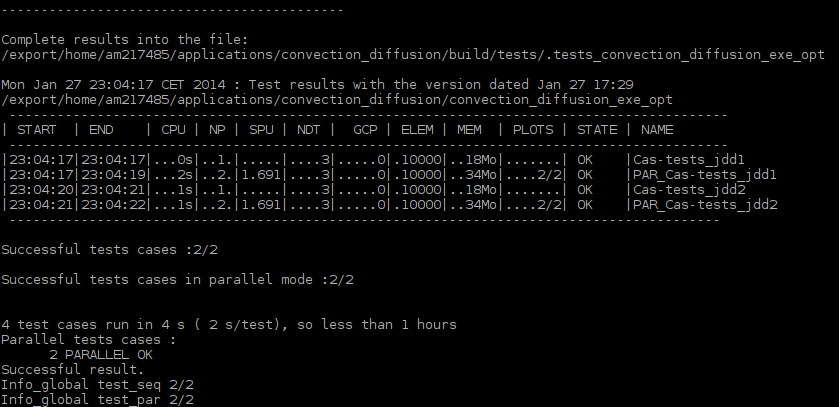
Figure 31 Non-regression test results#
Verification Report#
Conclusion#
In this tutorial, we have described, through the resolution of a convection-diffusion equation, the following aspects:
the development environment of the TRUST software, by building a new
BALTIKapplication,the specification and development workflow. This workflow requires technical choices, such as associating the convection velocity with a constituent rather than with the equation or problem. These choices are neither unique nor necessarily better than alternatives. The main purpose of this tutorial is to present a workflow accompanied by its own technical choices, while providing some recommendations and methodologies to follow during the specification phase.
the setup of non-regression tests and the automatic generation of a development verification report using tools provided by the TRUST software.