
Validation form#
As detailed in the Workflow guidelines, if you want your new and amazing developments in TRUST to be integrated, you need to create an associated validation form. The preferred way to build a validation form in TRUST and its BALTIKs is to write a Jupyter notebook.
You can find an example notebook at: $TRUST_ROOT/Validation/Rapports_automatiques/Verification/SampleFormJupyter or run on terminal:
Run_fiche -doc
This tutorial will help you get started with the validation form so that you can create detailed ones for your own developments.
First, copy the validation form named Source_canal_perio:
mkdir -p TRUST_tutorials/validation
cd TRUST_tutorials/validation
cp -r $TRUST_ROOT/Validation/Rapports_automatiques/Verification/Verification_codage/Source_canal_perio .
cd Source_canal_perio
The command to launch your validation form is Run_fiche, you can see the command options with:
Run_fiche -help
One useful option is:
Run_fiche -export_pdf
which creates a PDF in the build directory that replicates the results of your validation form.
Now, we are going to modify the validation form. Launch it using:
Run_fiche &
First, let’s add the mesh plot to the report. To do so, add a new Markdown cell at the end of the notebook:
## Additional information
### Mesh visualization
and the following:
fig=visit.Show("./std.lata", "Mesh", "dom", plotmesh=True, title="Mesh")
fig.plot()
You can also add the evolution of residuals to the report in log scale. Create a new Jupyter text cell and write:
## Residual plot
Then, in another cell, plot the residuals using:
Graph = plot.Graph("Residual plot")
Graph.addResidu("std.dt_ev",label="Residu")
Graph.scale(yscale='log')
In order to visualize the pressure field of the last time step, complete the section Additional information with a new cell:
## Visualizing fields
Then try to find how to display that field by referring to the SampleFormJupyter available with Run_fiche -doc
Now, you will extract the number of cells and the simulation final time from the three .err files and write it in .dat files.
The extraction script, called extraction.sh, is already available in the src directory of this validation form, you can examine it there.
To use it from your validation form, use executeScript from run module of trustutils (see SampleFormJupyter for help).
Add a table to display the results of .dat files, complete the chapter Additional information by creating new cells.
Tip
See Figure 26 for an example of a table plot.
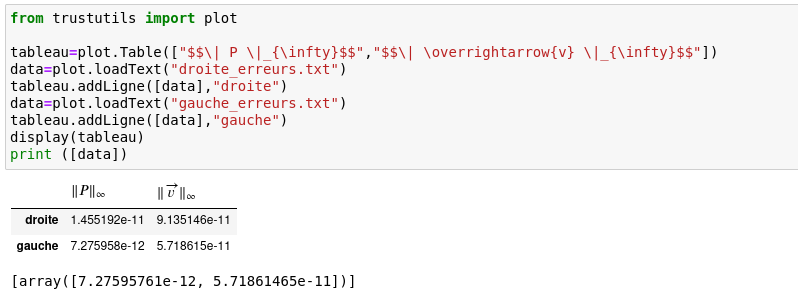
Figure 26 Example of a Jupyter Notebook block#
Now, we are going to add a fourth test case: debit4 which corresponds to std test case with zero initial velocity and imposed flow rate to \(2 m^3 \cdot s ^{-1}\) on periox boundary.
Add the test case using substitute and addCase
Then, re-run the form from the beginning, by clicking on the icone corresponding to the r̈estart of the Jupyter kernel and run of the whole notebook.
Eventually, build the pdf report with:
Run_fiche -export_pdf